Agribound
Unified agricultural field boundary delineation from satellite imagery using geospatial foundation models, pre-trained segmentation, and embeddings.









Agribound provides a single interface to multiple delineation engines and satellite sources, handling the full pipeline from satellite composite generation through post-processing and export. It supports Google Earth Engine-based imagery (Landsat, Sentinel-2, HLS, NAIP, SPOT), USGS NAIP Plus (direct ImageServer, no GEE required), local GeoTIFFs, and pre-computed embedding datasets (Google Satellite Embedding, TESSERA).
The pipeline runs: composite building → optional fine-tuning → delineation engine → post-processing (smooth, simplify, filter) → LULC crop filtering → export. For ensembles, SAM2 boundary refinement is applied per source for pixel-accurate boundaries.
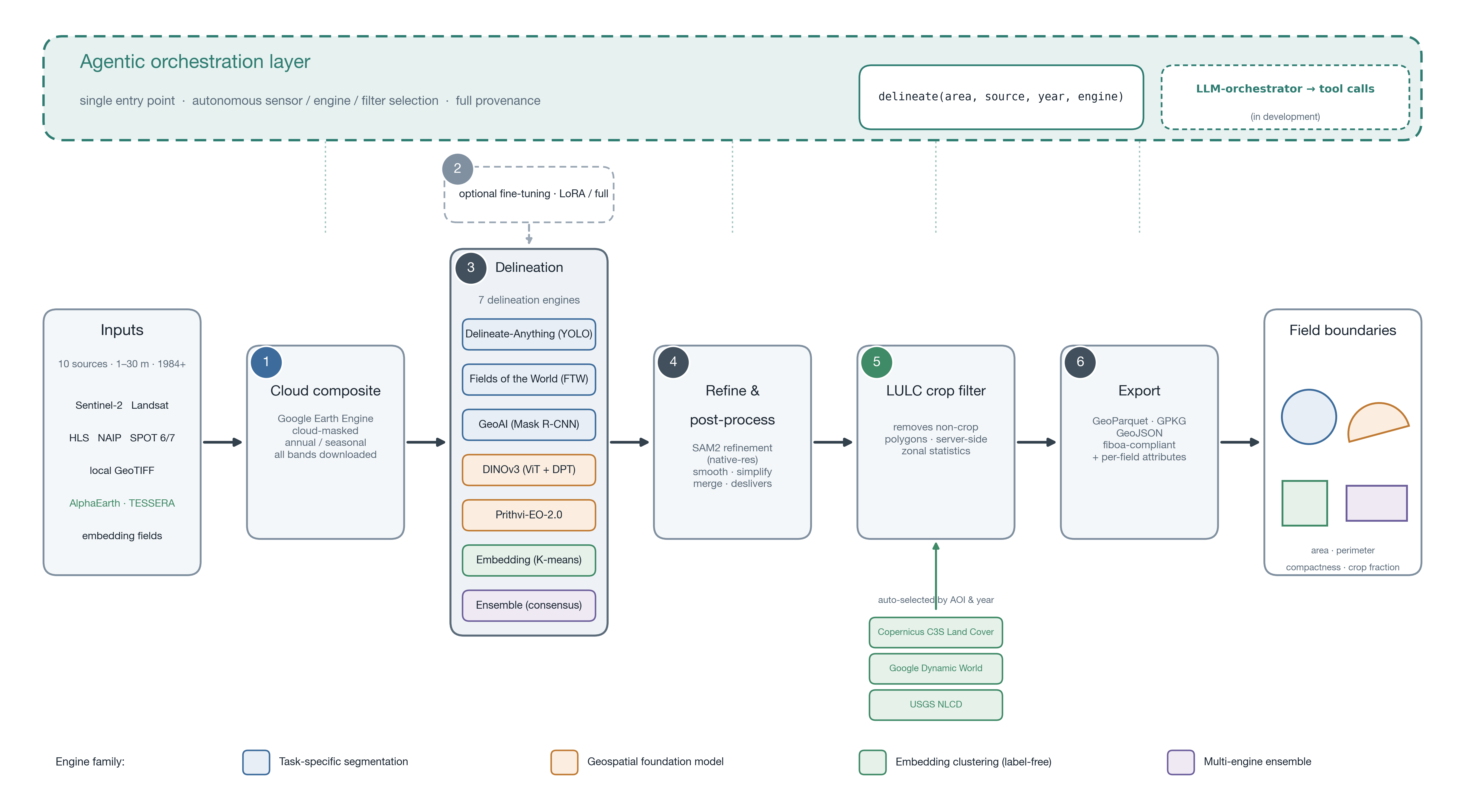
The agribound framework. An agentic orchestration layer exposes the whole pipeline through a single delineate() entry point and autonomously selects the sensor, engine, and LULC filter — and a natural-language LLM-orchestrator is in development. The six-stage pipeline runs from ten satellite/embedding sources (1984–present) through cloud compositing, optional fine-tuning, delineation by one of seven engines (task-specific segmentation, geospatial foundation models, and label-free embedding clustering, plus ensembling), SAM2 refinement and post-processing, server-side LULC crop filtering (USGS NLCD, Google Dynamic World, Copernicus C3S Land Cover), and export to standards-compliant vector formats.
Automatic LULC Crop Filtering
Unlike other field boundary packages that detect all visual boundaries (including roads, water, forests, and buildings), agribound automatically removes non-agricultural polygons using land-use/land-cover data. This is enabled by default and requires no user configuration.
The best available LULC dataset is selected automatically based on your study area:
- US: USGS Annual NLCD (1985–2024, 30 m) — classes 81/82 (Pasture, Cultivated Crops)
- Global (≥2015): Google Dynamic World (10 m, nearest year) — crop probability band
- Global, pre-2015: Copernicus C3S Land Cover (1992–2022, 300 m) — cropland classes
Disable with lulc_filter=False for local files without GEE access or unsupervised embedding workflows.
Example Results
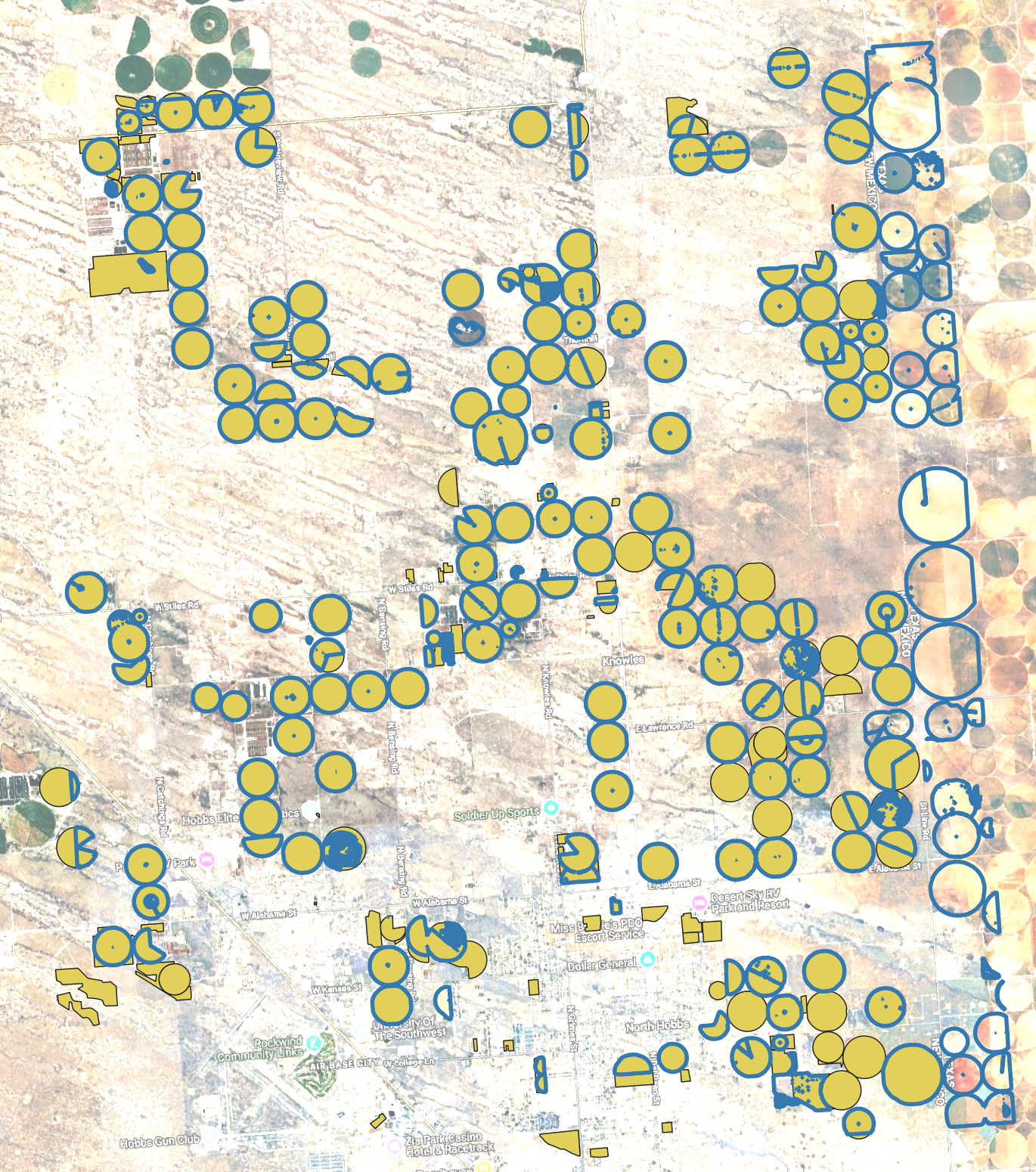
Supervised: DINOv3 + SAM2 on NAIP (Eastern Lea County, New Mexico, USA) — Fine-tuned on NMOSE reference boundaries, LULC-filtered (NLCD), SAM2-refined on 1 m NAIP. Blue = predicted, yellow = reference. Note: Fields in Texas bordering New Mexico are also present.
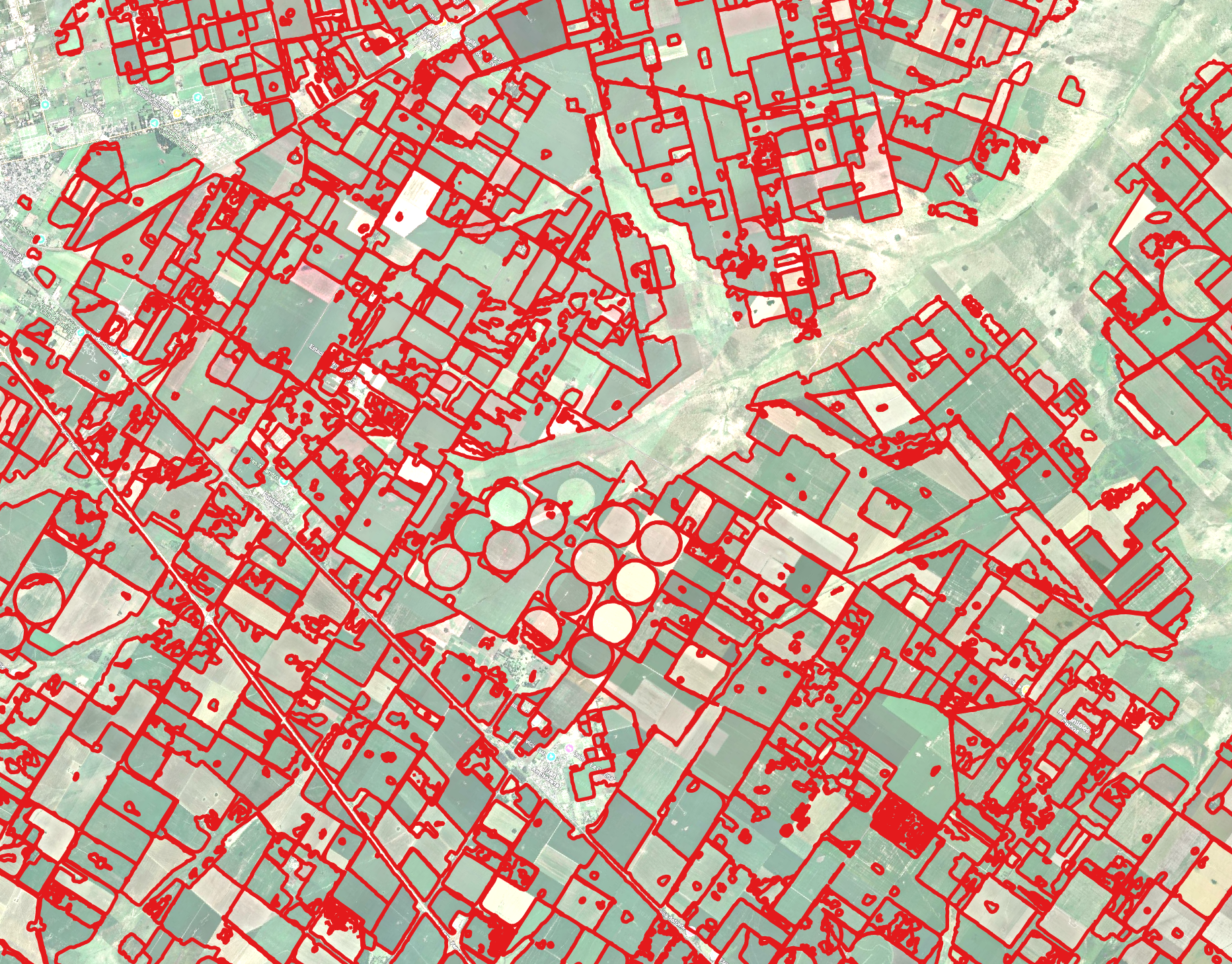
Unsupervised: TESSERA + LULC Filter + SAM2 (Pampas, Argentina) — No training, no reference data. TESSERA embedding clustering + LULC crop filter (Dynamic World) + SAM2 on Sentinel-2.
See the Gallery for results across all regions and engines.
Note: The satellite basemap shown in these screenshots may not correspond to the same acquisition date as the imagery used for delineation.
Quick Install
For GPU-accelerated engines and GEE support, install optional extras:
See the Installation guide for all available extras.
Quickstart
import agribound

gdf = agribound.delineate(
    study_area="area.geojson",
    source="sentinel2",
    year=2024,
    engine="delineate-anything",
    gee_project="my-gee-project",
)
The returned GeoDataFrame contains field boundary polygons with area, perimeter, and provenance metadata. See the Quickstart tutorial for a complete walkthrough.
Key Sections
| Section | Description |
|---|---|
| Installation | Install agribound and optional dependencies |
| Quickstart | 5-minute tutorial covering Python and CLI usage |
| Satellite Sources | Available imagery sources and compositing options |
| Engines | Comparison of all seven delineation engines |
| Configuration | Full reference for AgriboundConfig |
| CLI Usage | Command-line interface reference |
| API Reference | Python API documentation |
| Gallery | Visual results across 9 regions, 5 satellites, and all engines |
| Contributing | Developer guide for adding engines and sources |
| Citation & References | How to cite agribound, funding sources, and disclaimer |
Roadmap: Agentic Orchestration
Agribound already performs a form of autonomous orchestration: a single agribound.delineate() call decides which composite to build, selects the LULC dataset by area and year, routes canonical bands to each engine, tiles and parallelizes large areas, and chains delineation → refinement → filtering → export — all without user micromanagement.
The next step, currently in development, is an LLM-orchestrator that layers a natural-language, agent-driven interface on top of this machinery. Instead of choosing the source, engine, filter, and post-processing yourself, you describe the goal and an agent plans and executes the underlying agribound tool calls, reasons over the intermediate results, and reports what it did.
How it will work. Agribound's core operations — delineate(), query_ftw(), fine-tuning, SAM2 refinement, LULC filtering, and evaluation — are exposed to the agent as typed tools. Given a request, the orchestrator:
- Plans a workflow — e.g., pick a sensor and year, decide whether fine-tuning is warranted (are reference boundaries available?), and choose an engine and LULC filter appropriate to the region.
- Executes the resulting tool calls, tiling and caching exactly as the deterministic pipeline does today.
- Reflects on intermediate output — e.g., if too few polygons survive the crop filter it can lower the threshold or switch LULC datasets and re-run; if boundaries look coarse it can enable SAM2 refinement at native resolution.
- Reports the chosen configuration and full provenance, so every agent-driven run stays as reproducible as a hand-written one.
Planned interface (illustrative; subject to change):
import agribound as ab

# Natural-language request -> the agent plans and executes agribound tool calls
result = ab.agent(
    "Map irrigated field boundaries in this AOI for 2024, "
    "prefer a label-free approach, and refine the edges.",
    study_area="fields.geojson",
    gee_project="my-gee-project",
)
agribound agent "delineate smallholder fields in this AOI using Sentinel-2 for 2023" \
    --study-area fields.geojson
Design principles. The orchestrator will be model-agnostic (usable with hosted or local LLMs), opt-in via an optional extra (pip install agribound[agent]) so core installs stay lightweight, and transparent — it emits the exact tool calls and parameters it ran, never hiding decisions behind the natural-language layer. The deterministic delineate() API remains the supported path for scripted, reproducible pipelines; the agent is a convenience layer on top, not a replacement.
Under active development
This feature is not yet released. Follow the repository and CHANGELOG for updates.
License
Agribound is released under the Apache 2.0 License.